
About Pepsales
Pepsales AI is an AI-driven sales automation platform built for B2B sales teams. Its mission is to transform how sales leaders and account executives work by streamlining deal intelligence, speeding up sales cycles, and improving win rates through real-time conversational insights, Deal Pipeline and smart coaching.
In short, Pepsales helps companies bridge the gap between sales data and sales performance
Teammates
1 Senoir Product Designer
1 Product Design Intern ( Myself )
Engineers
My Role
I worked as a Product Design Intern, together with the Senior Product Designer to enhance existing design flows and bring visual consistency across critical product areas
My key responsbility are:
Defining revamp goals to align with B2B SaaS design standards.
Creating prototypes and Hi-Fi wireframe to validate design updates.
Conducting a UI audit of the existing Pre-Call and Post-Call experiences.
Problem Background
When I joined Pepsales, the Pre-Call and Post-Call screens had already been shipped and were part of the live product used by sales teams every day. However, as the platform scaled, the stakeholders began noticing usability gaps that affected the overall experience and brand consistency.
The issue wasn’t with functionality it was with how the design felt to Sales Person
Our Goal to Achieve
To bring the screens up to professional B2B design standards, improve usability, and revamp features that truly support sales reps before and after every call
Pre Call Screen ( Old Version )


Post Call Screen ( Old Version )


Solution & Design Evolution
1.Pre-Call Screen
The Pre-Call screen plays a critical role in how sales reps prepare before meetings. So let breakdown the each problem
Problem 1
The old Pre-Call screen felt visually unbalanced too much green, inconsistent spacing and uneven button sizes made it look outdated and cluttered.
Solution
Refined the visual rhythm by standardizing components (cards, buttons, spacing) and applying consistent color usage to create a clean, professional layout.


Problem 2
Reps couldn’t easily identify who was attending the call or distinguish between buyers, sellers, and internal teammates.
Solution
Clear Participant Section showing attendees with role labels (Buyer / Seller / Internal). Added an “Add Participant” option for quick last-minute changes

Problem 3
The Account Research feature was buried at the bottom of the screen behind an unclear icon.
Inside, the content was unstructured and text-heavy, mixing company details and notes in one long scroll.
Solution
Moved the Account Research entry to a more visible location (top-right corner with suitable icon). Redesigned the experience into three dedicated tabs Research, Buyer Intelligence, and Notes making information easier to scan and digest.

2.Post-Call Screen
The Post-Call screen is just as important it helps sales reps review meetings, capture insights, and plan next steps.
Problem 1
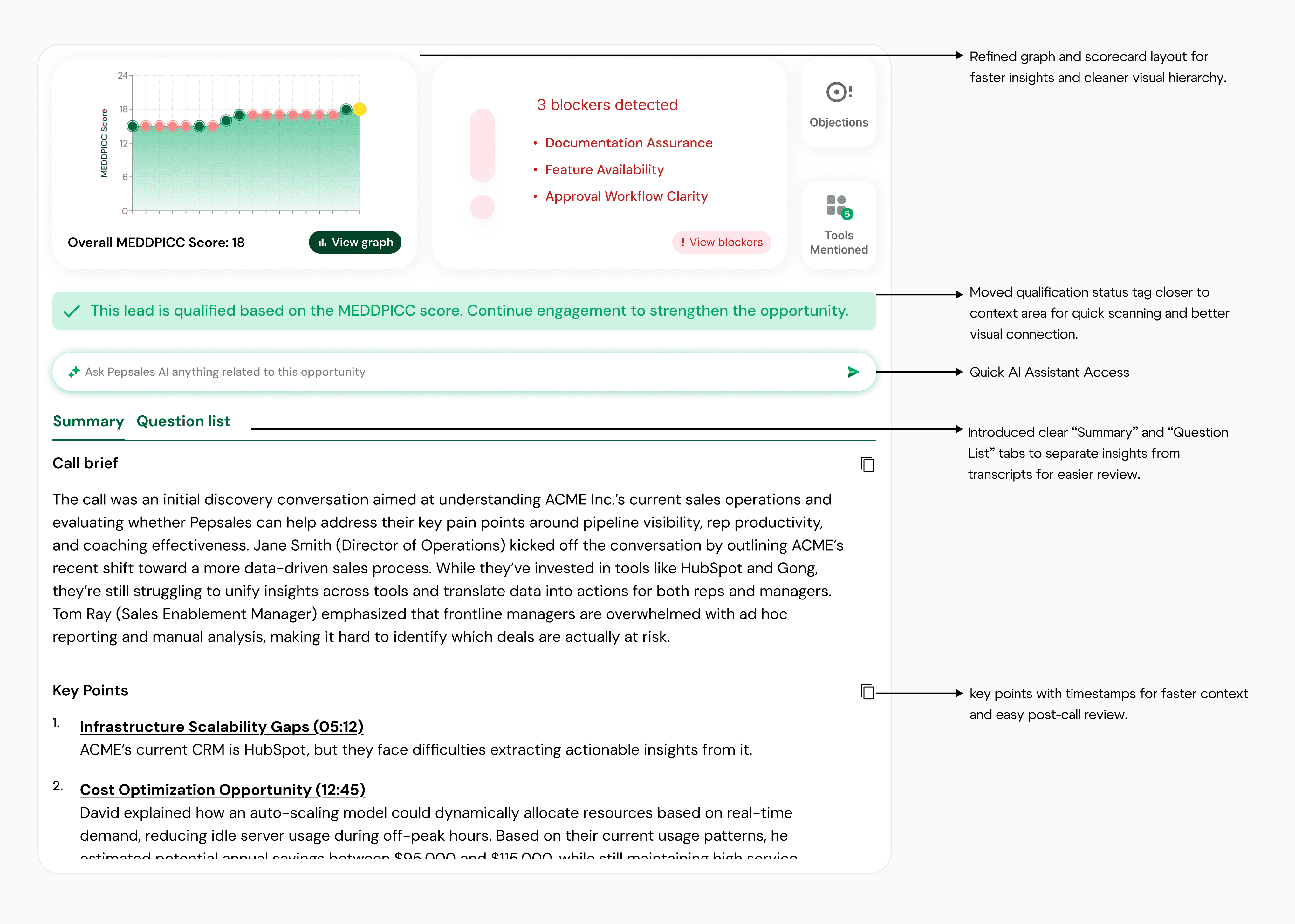
The layout suffered from uneven spacing, inconsistent button styles, and scattered information. Reps confuse and search for key actions like follow-ups or scorecards.
Solution
Refined the layout to use a unified component system, balanced spacing, and structured hierarchy. Grouped related elements (Follow-ups, Scorecards, Qualification Tags) more structured format

Problem 2
The Action Items section lacked clarity and interaction. Tasks were static, without due dates or completion indicators making it difficult for reps to track progress.
Solution
Redesigned Action Items into interactive checkboxes with scheduling options and reminders, allowing reps to track and complete tasks more effectively


Problem 3
Sometimes sales calls happens in offline rather than virtual setup where couldn’t track data accurately because everyone used the same device.
Solution
We introduced an Offline Mode that lets reps mark meetings as “In-Person,” ensuring data tracking remains accurate even when use same device.


Design Takeaways
This project helped me understand how small inconsistencies across live products can have a big impact on usability and perception..
Collaborating with the senior product designer also strengthened my understanding of:
Creating scalable component systems that keep B2B products consistent.
Using UI audits to uncover hidden UX gaps that often go unnoticed.
How to balance business priorities (accuracy, speed) with user empathy (clarity, confidence)